 OpenDBC
Tutorials › dbc Classic › 4
Textures
Turn plain shapes into bricks and crystal: load a picture, wrap it, repeat it, slide it.
What you need


Copy both files from the repository next to your .dba. Relative paths are resolved from
the program's folder.
Images and textures
LOAD IMAGE reads a picture into a numbered image slot. TEXTURE OBJECT wraps that image
around an object. One image can texture many objects.
load image "bricks.jpg", 1
make object box 1, 60, 30, 2
texture object 1, 1
Repeat and scroll
A big wall with one brick picture looks stretched. SCALE OBJECT TEXTURE repeats the image:
here 4 times across and 2 times down. SCROLL OBJECT TEXTURE slides it every frame, which is how
you make conveyor belts, rivers or moving skies.
scale object texture 1, 4, 2
...
scroll object texture 1, 0.002, 0
See-through objects
GHOST OBJECT ON blends an object with what is behind it. It suits glass, water, flames and
glowing effects.
rem Textures - OpenDBC tutorial (DarkBASIC Classic)
rem Media: bricks.jpg and crystal.jpg from examples/dbc/tutorials/3d
sync on : sync rate 60
autocam off
color backdrop rgb(12, 14, 24)

rem Load pictures into image slots 1 and 2
load image "bricks.jpg", 1
load image "crystal.jpg", 2

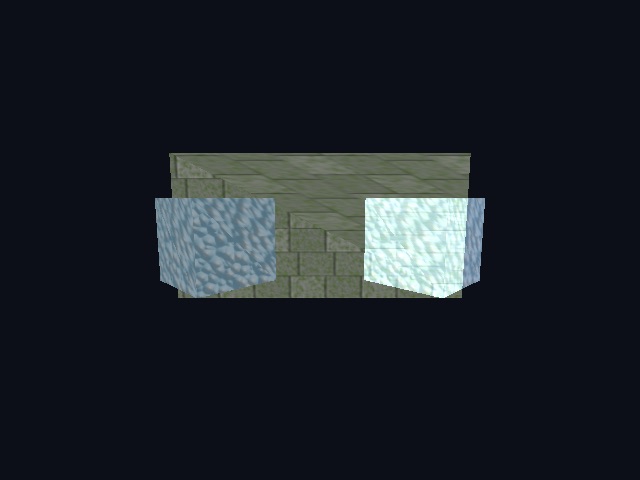
rem A brick wall: the texture repeats 4 times across, 2 times down
make object box 1, 60, 30, 2
position object 1, 0, 0, 20
texture object 1, 1
scale object texture 1, 4, 2

rem A crystal cube in front of it
make object cube 2, 12
position object 2, -15, 0, 0
texture object 2, 2

rem The same crystal, ghosted: you can see the wall through it
make object cube 3, 12
position object 3, 15, 0, 0
texture object 3, 2
ghost object on 3

position camera 0, 6, -45
point camera 0, 0, 0

do
   yrotate object 2, wrapvalue(object angle y(2) + 1)
   yrotate object 3, wrapvalue(object angle y(3) - 1)
   rem Slide the bricks sideways, like a conveyor
   scroll object texture 1, 0.002, 0
   sync
loop
Try this
- Texture a sphere with
crystal.jpg. - Fade the ghost cube with
FADE OBJECT. - Show the wireframe with
SET OBJECT: the wireframe flag is the argument immediately after the object number.
The repository's materials.dba
puts eight material settings side by side.