 OpenDBC
Tutorials › dbc Classic › 5
Lights
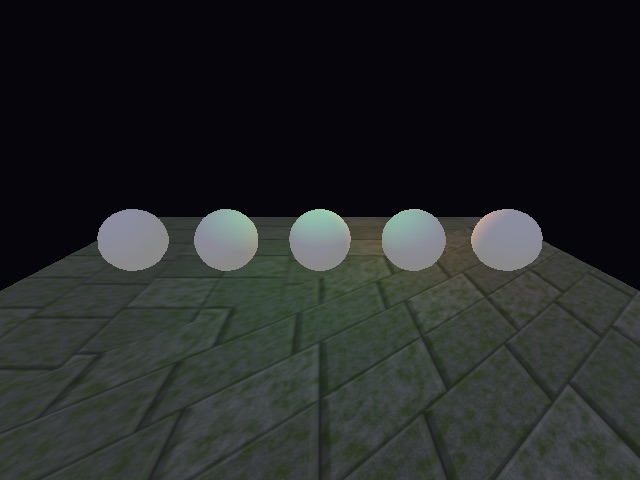
A moonlit floor, a warm bulb circling the spheres and a green spotlight from above.
What you need

Four kinds of light
| Ambient | Lights everything evenly, from nowhere. SET AMBIENT LIGHT sets its strength (0–100),
COLOR AMBIENT LIGHT its colour. |
|---|---|
| Directional | Parallel rays, like the sun. SET DIRECTIONAL LIGHT. |
| Point | Shines in every direction from a point, like a bulb. SET POINT LIGHT. |
| Spot | A cone, like a torch. SET SPOT LIGHT takes the inner and outer angles. |
Light 0 and the others
Light 0 exists by default and cannot be deleted. Create additional lights with MAKE LIGHT,
using a free positive number.
Dim the ambient light first, or coloured lights will be washed out:
lights_kinds.dba excerptDownload
set ambient light 25
set directional light 0, 0.2, -1, 0.5
color light 0, rgb(30, 40, 90)

make light 1
set point light 1, 0, 6, -8
color light 1, rgb(255, 170, 80)
set light range 1, 40
COLOR LIGHT sets the colour, SET LIGHT RANGE how far it reaches.
Moving lights
POSITION LIGHT and POINT LIGHT work like their object and camera cousins. A little
SIN and COS makes the bulb circle:
lights.dbaDownload
rem Lights - OpenDBC tutorial (DarkBASIC Classic)
rem Media: bricks.jpg from examples/dbc/tutorials/3d
sync on : sync rate 60
autocam off
color backdrop rgb(5, 5, 10)

load image "bricks.jpg", 1
make object box 1, 80, 1, 60
position object 1, 0, -6, 0
texture object 1, 1
scale object texture 1, 4, 3
for n = 2 to 6
   make object sphere n, 8
   position object n, -24 + (n - 2) * 12, 0, 0
next n

rem Dim the ambient light so the coloured lights stand out
set ambient light 25

rem Light 0 always exists: turn it into a faint blue moonlight
set directional light 0, 0.2, -1, 0.5
color light 0, rgb(30, 40, 90)

rem Light 1: a warm point light, like a bulb
make light 1
set point light 1, 0, 6, -8
color light 1, rgb(255, 170, 80)
set light range 1, 40

rem Light 2: a green spot light shining down from above
make light 2
set spot light 2, 15, 35
position light 2, 0, 30, 0
point light 2, 0, 0, 0
color light 2, rgb(80, 255, 140)
set light range 2, 60

position camera 0, 14, -38
point camera 0, 0, 0

do
   t = wrapvalue(t + 1)
   rem The bulb circles the spheres
   position light 1, sin(t) * 30, 6, cos(t) * 15
   sync
loop
Try this
- Toggle a light with
HIDE LIGHTandSHOW LIGHT. - Attach the spot to a moving object with
SET LIGHT TO OBJECT POSITION. - Add fog:
FOG ON,FOG COLOR,FOG DISTANCE.
The repository's lights.dba
adds a swinging lantern and key controls.