 OpenDBC
Tutorials › dbc Classic › 2
3D primitives
Seven built-in shapes, one command each. The quickest way to put something in 3D.
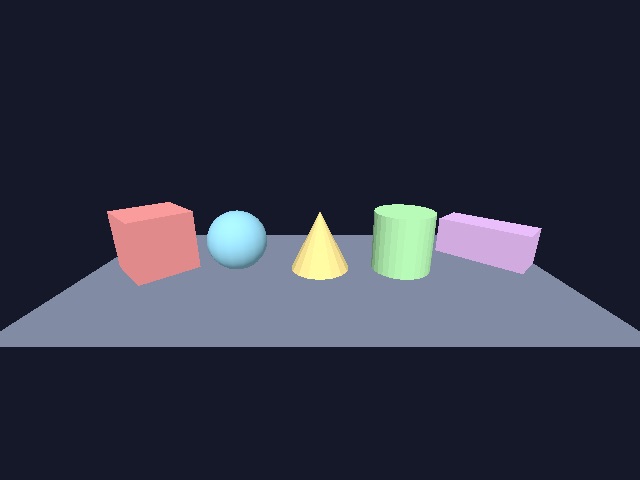
Objects have numbers
Every 3D object is identified by a number you choose. Each MAKE OBJECT command takes that
number, then the size:
make object cube 1, 10
make object sphere 2, 10
make object cone 3, 10
make object cylinder 4, 10
make object box 5, 14, 6, 6     : rem width, height, depth
make object plain 6, 80, 40     : rem a flat rectangle
See MAKE OBJECT CUBE, MAKE OBJECT SPHERE, MAKE OBJECT BOX and
MAKE OBJECT PLAIN. There is also MAKE OBJECT TRIANGLE.
Place, colour, rotate
New objects appear at the origin 0, 0, 0. X goes right, Y goes up, Z goes away from you.
position object 1, -28, 0, 0
color object 1, rgb(255, 90, 90)
xrotate object 6, 90             : rem lay the plain down as a floor
POSITION OBJECT moves an object, COLOR OBJECT paints it, and XROTATE OBJECT,
YROTATE OBJECT, ZROTATE OBJECT set its angle around each axis, in degrees.
Take the camera
By default the camera jumps to every new object. AUTOCAM OFF stops that, so you can place it
yourself with POSITION CAMERA and aim it with POINT CAMERA. COLOR BACKDROP sets
the sky colour.
Make them spin
OBJECT ANGLE Y reads the current angle; add a little each frame. WRAPVALUE keeps the
result between 0 and 360.
rem 3D primitives - OpenDBC tutorial (DarkBASIC Classic)
sync on : sync rate 60
autocam off
color backdrop rgb(20, 24, 40)

rem Every object gets a number you choose: 1, 2, 3...
make object cube 1, 10
make object sphere 2, 10
make object cone 3, 10
make object cylinder 4, 10
make object box 5, 14, 6, 6
make object plain 6, 80, 40

rem Line them up and give each one a colour
for n = 1 to 5
   position object n, -28 + (n - 1) * 14, 0, 0
next n
color object 1, rgb(255, 90, 90)
color object 2, rgb(90, 200, 255)
color object 3, rgb(255, 210, 80)
color object 4, rgb(130, 255, 130)
color object 5, rgb(220, 140, 255)

rem The plain is flat and faces the camera: lay it down as a floor
position object 6, 0, -6, 0
xrotate object 6, 90
color object 6, rgb(60, 70, 100)

position camera 0, 18, -50
point camera 0, 0, 0

do
   for n = 1 to 5
      yrotate object n, wrapvalue(object angle y(n) + n)
   next n
   sync
loop
Try this
- Give each object a different speed on a different axis.
- Use
SCALE OBJECTto stretch the cylinder into a pillar (100 is the original size). HIDE OBJECTandSHOW OBJECTon a key press.
The repository's shapes.dba
goes further: every shape with its size and position read back.