 OpenDBC
Tutorials › dbpro Professional
Clicking 3D objects
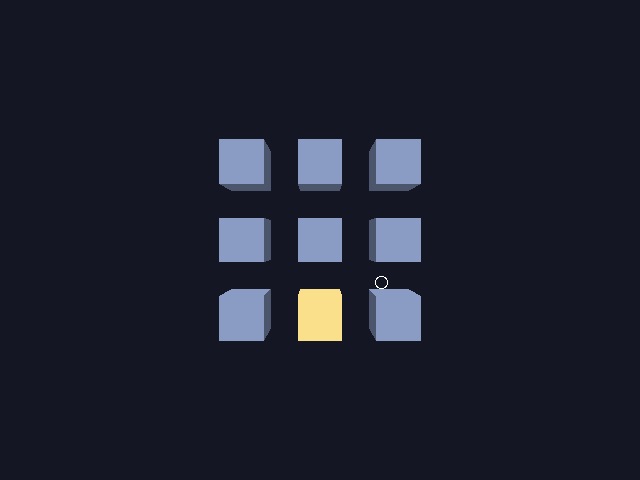
Highlight the cube under the mouse and spin it on a click: the base of menus, editors and strategy games.
PICK OBJECT
PICK OBJECT casts a ray from the camera through a screen point and returns the nearest object
it meets, among a range of object numbers, or 0 when there is none:
hit = pick object(mousex(), mousey(), 1, 9)After a hit, GET PICK DISTANCE tells how far the object is, and GET PICK VECTOR X
and its Y and Z counterparts return the offset from the camera to the hit.
Add the camera position to get world coordinates. Only read these values after a hit; a miss leaves
those from the previous hit unchanged.
Highlight and click
Recolour every object each frame: the picked one in gold, the others in blue. Act on
MOUSECLICK only for the picked one.
rem Clicking on 3D objects - OpenDBC tutorial (DarkBASIC Professional)
sync on : sync rate 60
autocam off
color backdrop rgb(20, 22, 36)

for n = 1 to 9
   make object cube n, 8
   position object n, ((n - 1) mod 3) * 14 - 14, ((n - 1) / 3) * 14 - 14, 0
   color object n, rgb(70, 90, 150)
next n
position camera 0, 0, -60
point camera 0, 0, 0

do
   rem Without a mouse, a pointer wanders over the grid on its own
   mx = mousex() : my = mousey()
   if mousemovex() = 0 and mousemovey() = 0 and mouseclick() = 0
      t = wrapvalue(t + 1)
      mx = screen width() / 2 + sin(t) * 120
      my = screen height() / 2 + cos(t * 2) * 90
   endif

   rem PICK OBJECT returns the nearest object under the point, or 0
   hit = pick object(mx, my, 1, 9)
   for n = 1 to 9
      if n = hit
         color object n, rgb(255, 200, 70)
         if mouseclick() = 1 then yrotate object n, wrapvalue(object angle y(n) + 5)
      else
         color object n, rgb(70, 90, 150)
      endif
   next n

   ink rgb(255, 255, 255), 0
   circle mx, my, 6
   if hit > 0 then text 10, 10, "Object " + str$(hit) + "  distance " + str$(get pick distance(), 1)
   sync
loop
Without a mouse moving, the program sweeps a pointer of its own, which is what the screenshot shows.
Try this
- Drag the picked cube: move it by
MOUSEMOVEXwhile the button is held. - Delete it on a right click (
mouseclick() = 2) withDELETE OBJECT.