 OpenDBC
Tutorials › dbpro Professional
Several cameras
A chase view fills the screen while a top view follows the car in a corner: the start of minimaps, rear-view mirrors and split screens.
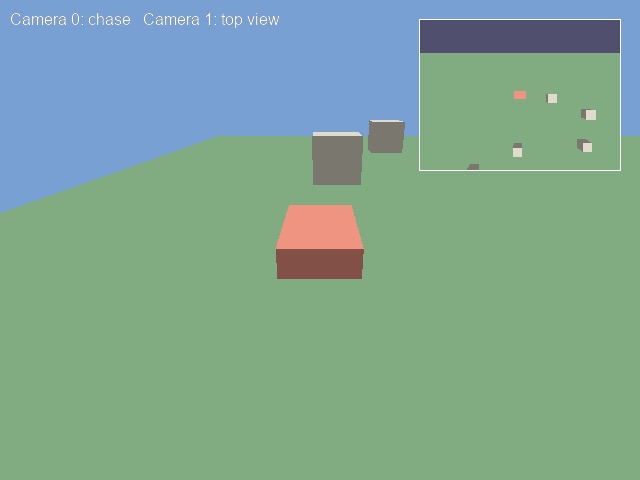
More than one camera
Camera 0 always exists and fills the screen. Professional lets you add more with MAKE CAMERA,
each with its own number, position and backdrop. Every camera is drawn at each SYNC, camera 0
first, then the others on top.
make camera 1Give it a rectangle
SET CAMERA VIEW takes the camera number and the left, top, right and bottom of the
rectangle it draws into, in screen pixels. COLOR BACKDROP with a camera number gives that view
its own sky colour.
set camera view 1, screen width() - 220, 20, screen width() - 20, 170
color backdrop 1, rgb(20, 20, 40)
Drive each camera
Camera commands take the camera number first. SET CAMERA TO FOLLOW places camera 0 behind
the car; POSITION CAMERA and POINT CAMERA hold camera 1 above it, looking down.
The small + 0.1 keeps the view from pointing exactly straight down, where the camera
cannot tell which way is forward.
set camera to follow 0, object position x(2), 2, object position z(2), object angle y(2), 40, 18, 10, 0
position camera 1, object position x(2), 140, object position z(2)
point camera 1, object position x(2), 0, object position z(2) + 0.1
2D on top
Text and drawing go over every view, in screen coordinates. Four LINE calls frame the
corner view so it reads as a separate screen.
rem Several cameras - OpenDBC tutorial (DarkBASIC Professional)
sync on : sync rate 60
autocam off
color backdrop rgb(120, 160, 210)

rem A field, a red car and a few crates
make object box 1, 300, 1, 300
color object 1, rgb(60, 110, 60)
make object box 2, 10, 4, 16
color object 2, rgb(230, 80, 60)
for n = 3 to 12
   make object cube n, 12
   position object n, rnd(240) - 120, 6, rnd(240) - 120
   color object n, rgb(200, 190, 160)
next n

rem Camera 0 exists already and fills the screen.
rem Camera 1 is a second view, drawn in a corner rectangle on top of it
make camera 1
set camera view 1, screen width() - 220, 20, screen width() - 20, 170
color backdrop 1, rgb(20, 20, 40)

do
   t = wrapvalue(t + 0.6)
   rem The car drives in a circle
   position object 2, sin(t) * 90, 2.5, cos(t) * 90
   yrotate object 2, wrapvalue(t + 90)

   rem Camera 0 chases the car from behind
   set camera to follow 0, object position x(2), 2, object position z(2), object angle y(2), 40, 18, 10, 0

   rem Camera 1 looks straight down from high above
   position camera 1, object position x(2), 140, object position z(2)
   point camera 1, object position x(2), 0, object position z(2) + 0.1

   rem 2D is drawn over every view, so a white frame outlines camera 1
   ink rgb(255, 255, 255), 0
   x1 = screen width() - 221 : x2 = screen width() - 20
   line x1, 19, x2, 19 : line x2, 19, x2, 170
   line x2, 170, x1, 170 : line x1, 170, x1, 19
   text 10, 10, "Camera 0: chase   Camera 1: top view"
   sync
loop
Try this
- Split the screen in two: give camera 0 the left half with
SET CAMERA VIEWand camera 1 the right half. - Make a rear-view mirror: a wide, thin view at the top, following the car backwards.
- Zoom the top view in and out with
SET CAMERA FOV. - Remove the second view with
DELETE CAMERA.