 OpenDBC
Tutorials › dbc Classic › 8
HUD and UI
A health bar, a score and a button, drawn over a 3D scene.
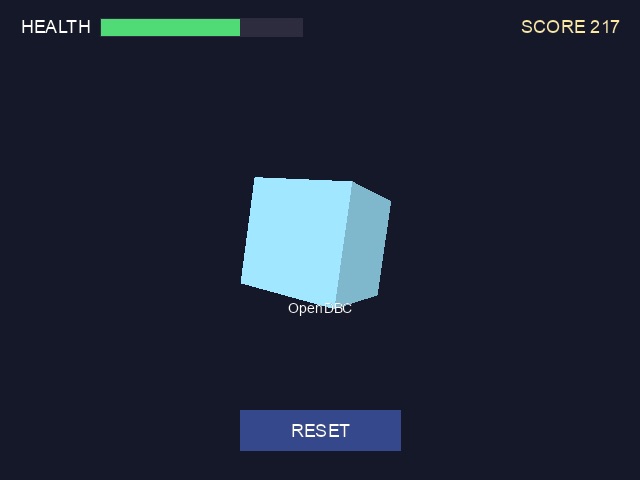
2D over 3D
With SYNC ON, everything you draw in 2D before SYNC lands on top of the 3D scene of
that frame. Redraw your interface every frame: the next frame starts from the 3D scene again.
Text
SET TEXT FONT and SET TEXT SIZE choose the font, INK the colour. TEXT
writes at a position, CENTER TEXT centres on one, and TEXT WIDTH measures a string, which
is how you align text to the right:
hud_text.dba excerptDownload
set text font "Arial"
set text size 18
...
ink rgb(255, 210, 90), 0
s$ = "SCORE " + str$(score)
text screen width() - text width(s$) - 20, 16, s$
A health bar
Two BOX calls: a dark background, then a filled part whose width follows the value.
Change the colour when it runs low:
hud_health.dba excerptDownload
ink rgb(40, 40, 60), 0
box 100, 18, 302, 36
if health > 30 then ink rgb(80, 220, 120), 0 else ink rgb(240, 70, 60), 0
box 101, 19, 101 + health * 2, 35
A button
A button is a box that checks the mouse. MOUSEX and MOUSEY give the pointer,
MOUSECLICK the buttons held (1 for left):
hud_button.dba excerptDownload
over = mousex() > bx and mousex() < bx + 160 and mousey() > by and mousey() < by + 40
if over = 1 and mouseclick() = 1 then score = 0hud.dbaDownload
rem HUD and UI - OpenDBC tutorial (DarkBASIC Classic)
sync on : sync rate 60
autocam off
color backdrop rgb(20, 24, 40)
make object cube 1, 10
color object 1, rgb(90, 200, 255)
position camera 0, 8, -30
point camera 0, 0, 0

set text font "Arial"
health = 100
score = 0

do
   rem --- The 3D scene
   yrotate object 1, wrapvalue(object angle y(1) + 1)
   xrotate object 1, wrapvalue(object angle x(1) + 0.5)

   rem --- Game state: health drains, score climbs
   health = health - 1
   if health < 0 then health = 100
   score = score + 7

   rem --- 2D on top of 3D: anything drawn before SYNC lands over the scene
   set text size 18
   ink rgb(255, 255, 255), 0
   text 20, 16, "HEALTH"
   ink rgb(40, 40, 60), 0
   box 100, 18, 302, 36
   if health > 30 then ink rgb(80, 220, 120), 0 else ink rgb(240, 70, 60), 0
   box 101, 19, 101 + health * 2, 35

   ink rgb(255, 210, 90), 0
   s$ = "SCORE " + str$(score)
   text screen width() - text width(s$) - 20, 16, s$

   rem A button: highlighted under the mouse, reacts to a click
   bx = screen width() / 2 - 80 : by = screen height() - 70
   over = mousex() > bx and mousex() < bx + 160 and mousey() > by and mousey() < by + 40
   if over = 1 then ink rgb(90, 140, 255), 0 else ink rgb(50, 70, 140), 0
   box bx, by, bx + 160, by + 40
   ink rgb(255, 255, 255), 0
   center text bx + 80, by + 10, "RESET"
   if over = 1 and mouseclick() = 1 then score = 0

   set text size 14
   center text screen width() / 2, screen height() / 2 + 60, "OpenDBC"
   sync
loop
Try this
- Make the button react once per click, not every frame it is held.
- Use a picture for the button:
LOAD IMAGEandPASTE IMAGE. - Show where a 3D object is on screen with
OBJECT SCREEN XandOBJECT SCREEN Y.